Monero node on a VPS: pruned vs full, specs and costs
Published 19 Nov 2026
Run a Monero node on a VPS: pruned vs full disk sizes, RAM and bandwidth, which providers allow it, and how to connect Feather or Cake Wallet over Tor.
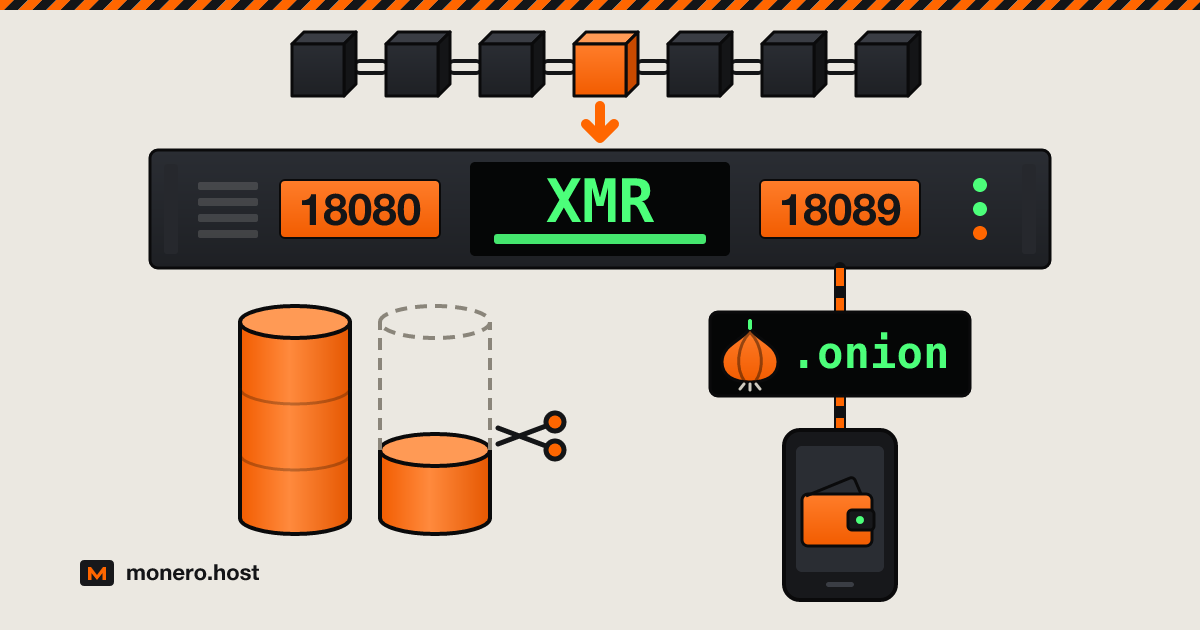
A Monero node on a VPS gives your wallet a node that only you use, online around the clock, without a 100 to 250 GiB database on your laptop. This guide covers the numbers that decide the plan, which providers in our directory allow a node in their terms, and a setup that ends with Feather, Cake Wallet or the GUI talking to monerod over Tor.
Checked on 1 October 2026.
Why run your own Monero node
Your wallet does not hold the blockchain: it asks a node for blocks and hands it every transaction you send. When that node belongs to someone else, getmonero.org's FAQ says its operator can see the IP address a transaction comes from (not the recipient or the amount) and in some extreme cases attempt attacks that reduce your privacy. Feather's documentation adds the limits: a remote node cannot steal funds or see your balance, but a malicious one can try to reveal the real input of a transaction or skew your fee so your transactions stand out.
Your own node removes that third party. On a VPS, it also means:
- Your wallet reaches it through an onion address, so your home IP never touches the Monero network.
- Transactions you send leave the node over Tor, so the VPS address is not tied to them either.
- The node holds no keys. Your seed stays on your device, and the provider sees a server running monerod, not your wallet.
Full or pruned: disk, RAM, CPU and bandwidth
A pruned node keeps the full transaction history but drops 7/8 of the older ring signature data, while the latest 5,500 blocks stay complete. That saves about two thirds of the disk, and Moneropedia says it has no privacy or security downside. The cost: you help new nodes sync far less, so the project prefers full nodes when the disk allows. Choose before the first sync: pruning switched on later does not shrink the file (the monero-blockchain-prune tool writes a pruned copy instead).
| Pruned node | Full node | |
|---|---|---|
| Blockchain on disk (Monero docs, 20 January 2026) | about 100 GiB | about 250 GiB |
| Free SSD the docs recommend | 250 GiB or more | 625 GiB or more |
| RAM the docs recommend | 4 GB or more | 4 GB or more |
| First sync downloads | about a third of the chain, with sync-pruned-blocks |
the whole chain |
These Monero blockchain sizes and recommendations come from the systemd guide in the Monero docs. For scale, the getmonero.org FAQ put the full chain at about 225 GB in 2024. Use SSD or NVMe; the same FAQ names an old hard drive as a reason a first sync drags on.
CPU. No minimum is published. monerod runs its parallel jobs on every CPU thread by default, and fast-block-sync (on by default) skips the costly RandomX checks on old blocks using hashes embedded in the release. More cores help during the first sync; afterwards the node mostly waits for a block every two minutes.
Bandwidth. After the first sync, upload depends on how many peers you serve. The default upload limit is 8,192 kB/s, and monerod counts a kB as 1,024 bytes, so a saturated link could push about 21.7 TB in 30 days. On a plan with a traffic cap, set limit-rate-up: 1,024 kB/s holds the worst case to about 2.7 TB a month.
Choosing a VPS for monerod
Three things matter more than the CPU model:
- Disk. About 160 GB for a pruned node today, 350 GB or more for a full one (the docs advise more headroom), or a small VPS plus block storage. Object storage (S3) is no use: monerod needs its data directory on a mounted disk.
- Traffic. Unmetered, or a cap you protect with
limit-rate-up. - Terms. A node is not mining, but some providers ban both on certain products.
Ignore plan names: one Monero VPS page we checked labels a 25 GB plan a "pruned full node". Prices below are as published on 1 October 2026, in alphabetical order:
| Provider | Plan that fits | Per month | Node in the terms | Signup and Monero |
|---|---|---|---|---|
| BuyVM | Slice 4096 (4 GB, 1 dedicated core, 80 GB SSD, unmetered) plus block storage slabs of 256 GB | $16.25 with one slab (pruned), $17.50 with two (full) | AUP lets you use all the resources you pay for, short of hurting other clients; no clause on nodes or mining | Legal name and home address matching your payment, ordered from your home connection; crypto through the CoinPayments gateway, Monero among the listed coins |
| Cloudzy | 8 GB, 4 vCPU, 240 GB NVMe, 7 TB (pruned); 16 GB, 8 vCPU, 350 GB NVMe, 10 TB (full) | $26.48 / $49.98 (50% off $52.95 / $99.95) | Its Monero VPS page advertises running monerod; AUP (May 2026) has no node clause | Email only; XMR at checkout |
| Kyun | Build your own: 2 vCPU, 4 GiB, 150 to 300 GB | about €15 to €24 | AUP has no clause on crypto nodes or mining; suggested daily fair use averages of 50% CPU, 20 MB/s disk, 100 Mbit/s network | Password and a proof-of-work, no email; Monero deposits |
| NiceVPS | VPS disks stop at 200 GB; dedicated E3-2v3 (16 GB, 480 GB SSD, 15 TB out) | €149 | Terms (last updated 2017) have no node clause | Username and password, email optional; Monero processed in-house |
| Privex | V16-SE-SSD in Sweden (16 GB, 6 cores, 200 GB SSD, 100 Mbps, 16 TB), pruned only | $80 | Order terms bar abusing VPS disk or CPU; also sells VPS built for Hive nodes | A name (aliases allowed), email and a stated purpose; XMR at order |
| Servers Guru | 6 vCPU, 8 GB, 160 GB NVMe, 20 TB out (Netherlands or Canada); extra NVMe at €0.08/GB for a full node | €17.49 (€32.69 with 190 GB extra) | Nodes and mining allowed on regular and unmetered VPS, banned on ARM VPS, cloud servers and web hosting | Email only, temporary addresses accepted; XMR |
Servers Guru's terms are the only ones that address blockchain nodes outright. Check Kyun's fair use averages against a first sync, which works disk and CPU hard until it ends; on 1 October its order system offered a 150 or 300 GB VM in Spokane but not in Amsterdam or Bucharest. BuyVM has the cheapest disk but asks the most about you, and its terms state that it has belonged to Cloudzy since January 2025. For more options, filter the VPS bay by Takes XMR and No KYC, or start from our list of hosting providers that accept Monero. If you still need coins, see how to buy Monero without KYC, and order over Tor as described in our step-by-step VPS guide.
Install and sync monerod
The current CLI release is v0.18.5.1, published 8 July 2026; use a newer one if the downloads page lists it. v0.18.5.0 removed UPnP, so the old no-igd line is no longer needed. On Debian or Ubuntu, as root, install the tools and create a user and directories:
apt install -y wget gnupg bzip2
useradd --system monero
mkdir -pm 750 /etc/monero /var/lib/monero /var/log/monero
chown root:monero /etc/monero
chown monero:monero /var/lib/monero /var/log/monero
If the chain goes on block storage, mount that volume at /var/lib/monero before the chown. Download the release and verify it, following the official guide. hashes.txt is signed by binaryFate, whose key fingerprint must read 81AC 591F E9C4 B65C 5806 AFC3 F0AF 4D46 2A0B DF92:
wget https://downloads.getmonero.org/cli/monero-linux-x64-v0.18.5.1.tar.bz2
wget https://www.getmonero.org/downloads/hashes.txt
wget -O binaryfate.asc https://raw.githubusercontent.com/monero-project/monero/master/utils/gpg_keys/binaryfate.asc
gpg --keyid-format long --with-fingerprint binaryfate.asc
gpg --import binaryfate.asc
gpg --verify hashes.txt
sha256sum monero-linux-x64-v0.18.5.1.tar.bz2
grep monero-linux-x64 hashes.txt
You want "Good signature from binaryFate" and two identical hashes. Then install the binaries:
tar -xjf monero-linux-x64-v0.18.5.1.tar.bz2
cp monero-x86_64-linux-gnu-v0.18.5.1/monero* /usr/local/bin/
chown root:root /usr/local/bin/monero*
Write /etc/monero/monerod.conf. Every option is described in the monerod reference:
data-dir=/var/lib/monero
log-file=/var/log/monero/monero.log
log-level=0

# pruned node: delete these two lines for a full node
prune-blockchain=1
sync-pruned-blocks=1

check-updates=disabled
enable-dns-blocklist=1
in-peers=48
# about 2.7 TB a month at most
limit-rate-up=1024

# restricted RPC for wallets, local only
rpc-restricted-bind-ip=127.0.0.1
rpc-restricted-bind-port=18089
enable-dns-blocklist applies a blocklist of bad peers kept by Monero contributors. Then create /etc/systemd/system/monerod.service:
[Unit]
Description=Monero daemon
After=network-online.target
Wants=network-online.target

[Service]
User=monero
Group=monero
ExecStart=/usr/local/bin/monerod --config-file /etc/monero/monerod.conf --non-interactive
Restart=always
RestartSec=30

[Install]
WantedBy=multi-user.target
Start it and, if you use ufw, open only the P2P port:
systemctl daemon-reload
systemctl enable --now monerod
ufw allow 22/tcp
ufw allow 18080/tcp
ufw enable
monerod status
Port 18080 lets other nodes connect to you. Leave 18081 and 18089 closed: both RPC ports listen only on 127.0.0.1, and the unrestricted one on 18081 gives full control of the node. Run monerod status until it reports 100%.
Open it safely: restricted RPC and an onion service
The restricted RPC on 18089 answers view-only calls and withholds privacy-sensitive data, which is all a wallet needs. Instead of exposing it to the internet, publish it as an onion service. Install Tor (apt install tor) and add two onion services to /etc/tor/torrc, one for your wallets and one for other nodes:
HiddenServiceDir /var/lib/tor/monero-rpc
HiddenServicePort 18089 127.0.0.1:18089

HiddenServiceDir /var/lib/tor/monero-p2p
HiddenServicePort 18084 127.0.0.1:18084
Run systemctl restart tor, then read both addresses with cat /var/lib/tor/monero-rpc/hostname and cat /var/lib/tor/monero-p2p/hostname. Add three lines to monerod.conf, using the P2P address:
anonymous-inbound=P2P_ADDRESS.onion:18084,127.0.0.1:18084,24
tx-proxy=tor,127.0.0.1:9050,16,disable_noise
disable-rpc-ban=1
monerod hands the anonymous-inbound address to its Tor peers so they can spread it, and Monero's anonymity network notes ask for a separate onion service for the RPC; that split keeps your wallet address private. tx-proxy sends your wallets' transactions over Tor; those relayed for others still use clearnet. disable_noise speeds up broadcast, and disable-rpc-ban keeps monerod from banning the local Tor daemon that every wallet connection comes through. Restart monerod and test from the VPS:
curl -x socks5h://127.0.0.1:9050 http://RPC_ADDRESS.onion:18089/get_info
Treat the RPC onion address as a secret, since anyone who has it can use your restricted RPC, and back up /var/lib/tor/monero-rpc to keep it. Leave out public-node, which advertises a node to strangers.
Point Feather, Cake Wallet or the GUI at your node
- Feather: in Settings > Network > Node, untick Let Feather manage this list, choose Add custom node(s) and enter
RPC_ADDRESS.onion:18089. Under Settings > Network > Proxy, pick Tor and set node traffic to Always over Tor. Feather ships its own Tor. - Cake Wallet: open Settings, tap Connections under App settings and turn on Enable built-in Tor (Cake labels it experimental). Then tap Nodes under Wallet settings, tap +, enter the RPC onion address and port 18089, leave Use SSL off and switch on Trusted, which Cake reserves for nodes you control.
- Monero GUI (advanced mode): under Settings > Interface, enable Socks5 proxy with 127.0.0.1 and 9050 (9150 for Tor Browser), with Tor running on your computer. Under Settings > Node, pick Remote node, add the RPC onion address and port 18089, and tick Mark as Trusted Daemon.
Keeping it healthy through upgrades
Monero shipped four CLI releases between January and July 2026. To upgrade, verify the new archive as above, systemctl stop monerod, replace the binaries in /usr/local/bin and start it again. Point releases are recommended; network upgrades are mandatory, because Moneropedia warns that a node left on old software can no longer take part in the network. As of 1 October 2026, getmonero.org had announced none, so watch its blog.
Between releases, check df -h /var/lib/monero monthly, keep SSH on keys only, and enable automatic security updates.
FAQ
How can I run my own Monero node?
Rent a VPS with at least 4 GB of RAM and about 160 GB of SSD for a pruned node (350 GB or more for a full one), install the verified monerod release and run it under systemd. Wait for the first sync to reach 100%. Then publish the restricted RPC as an onion service and add that address to your wallet as a custom node.
Which Monero remote nodes are trusted?
None by default: trust comes from who runs the node, not from a list. The only node you can fully trust is one you run. If you use someone else's, pick one run by a person you know, reach it over Tor, and do not mark it as trusted in your wallet.
What are the requirements for a Monero node?
The Monero docs recommend 4 GB of RAM or more and an SSD. On 20 January 2026 the chain took about 250 GiB as a full node and about 100 GiB pruned, and the docs advise 625 GiB or 250 GiB of free space. Traffic must cover the first sync plus your uploads to peers.
Do you earn rewards for running a Monero node?
No. getmonero.org's FAQ explains that the block reward of 0.6 XMR plus transaction fees goes to the miners who secure the network. A node that only relays transactions and serves blocks has nothing to collect. What you get is privacy for your own transactions and a stronger network.
The short version
Enough disk for the chain you want, terms that allow a node, a signup you can live with. Verify the binaries, prune if the disk is tight, keep every RPC port closed and reach the node only through its onion address. Your wallet then talks to a node nobody else controls.